Device Auto Discovery
Device Auto Discovery lets Kratos automatically find Kam and Kapta devices on the network instead of adding them manually.
Default: Off.
When this preview is enabled:
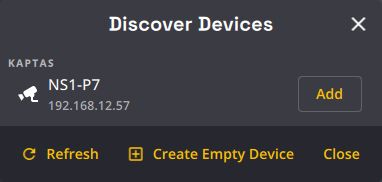
- The + (Add Device) button of the Show Explorer Cameras tab opens the Discover Devices dialog (see Discovering devices).
- The Calibration Database button and per-device calibration status badges are shown, so factory calibrations are applied automatically when a device connects.
- Kaptas are no longer added to the show automatically when they appear on the network: add them from the Discover Devices dialog, like Kams.
Factory calibrations
Each Kam and Kapta is calibrated in the factory. With this preview on, Kratos recognizes each device and loads its factory calibration from the Naostage Calibration Database. The database is kept on the station, so it also works without an Internet connection; the Internet is only needed to get the latest calibrations.