KratOsc
A large part of the Kratos API is accessible via OSC. This allows you to remotely control Kratos parameters from any third-party systems that can send OSC commands.
For Kratos to be able to receive OSC commands, you must first need to create a KratOSc Module.
This document describes the OSC address patterns used to control Kratos parameters.
Module
URI: /kratos/modules/<module_name>/<property>
| property | argument | min | max | read/write | description |
|---|---|---|---|---|---|
connected |
int | 0 | 1 | r | Is module connected |
description |
string | r | Module description | ||
enabled |
int | 0 | 1 | r/w | Enable or disable the Module |
info_message |
string | r | Module status message |
Module Parameters
URI: /kratos/modules/<module_name>/parameters/<parameter>
PSN Module Parameters
| parameter | argument | min | max | read/write |
|---|---|---|---|---|
offset |
float,float,float | r/w | ||
output_frequency |
float | r | ||
output_ip |
string | r/w | ||
output_name |
string | r/w | ||
output_port |
int | r/w | ||
output_send_only_valid |
int | 0 | 1 | r/w |
output_ttl |
int | r/w | ||
x_remap |
string | r/w | ||
y_remap |
string | r/w | ||
z_remap |
string | r/w | ||
tx_bytes_per_second |
int | r |
OSC Module Parameters
| parameter | argument | min | max | read/write |
|---|---|---|---|---|
input_address |
string | r/w | ||
input_enabled |
int | 0 | 1 | r/w |
input_port |
int | r/w | ||
output_address |
string | r/w | ||
output_enabled |
int | 0 | 1 | r/w |
output_port |
int | r/w | ||
rx_bytes_per_second |
int | r | ||
tx_bytes_per_second |
int | r | ||
feedbackperiodms (only for KratOSC) |
int | r |
HTTP Module Parameters
| parameter | argument | min | max | read/write | description |
|---|---|---|---|---|---|
baseAddress |
string | r/w | Base URL for all requests (e.g., https://api.example.com) |
||
timeout |
int | 0 | 60000 | r/w | Request timeout in milliseconds |
authType |
string | r/w | Authentication type: None, Basic, Bearer. If the value is not in the allowed range, an error is returned and the value remains unchanged. |
||
authUsername |
string | r/w | Username for Basic authentication | ||
authPassword |
string | r/w | Password for Basic authentication | ||
authToken |
string | r/w | Token for Bearer authentication |
SpaceMouse Module Parameters
| parameter | argument | min | max | read/write | description |
|---|---|---|---|---|---|
device |
string | r/w | Select SpaceMouse device | ||
target |
string | r/w | Target to control with the SpaceMouse | ||
actionArea |
string | r/w | Bounding area to clamp target movement (empty = no bounding) | ||
pan2dMode |
int | 0 | 1 | r/w | Pan a focused 2D camera view instead of a 3D target |
focusedView |
int | r/w | View id of the camera view this SpaceMouse's 2D pan controls (0 = none) | ||
inputMovement |
string | r/w | Movement source: "Translation", "Rotation", "Combined" |
||
autoReleaseTarget |
int | 0 | 1 | r/w | Auto-grab target into manual mode on stick input (0 = manual only) |
useAsCursor |
int | 0 | 1 | r/w | Drive a ghost cursor in 2D mode, used by the Quick Assign button |
enableX |
int | 0 | 1 | r/w | Enable X axis movement |
enableY |
int | 0 | 1 | r/w | Enable Y axis movement |
enableZ |
int | 0 | 1 | r/w | Enable Z axis movement |
zAsZoom |
int | 0 | 1 | r/w | When set, Z drives camera zoom instead of target Z |
invertX |
int | 0 | 1 | r/w | Invert X axis movement |
invertY |
int | 0 | 1 | r/w | Invert Y axis movement |
invertZ |
int | 0 | 1 | r/w | Invert Z axis movement |
swapXY |
int | 0 | 1 | r/w | Swap X and Y axes |
sensitivity3d |
float | 0.01 | 100 | r/w | 3D movement speed multiplier (m/s) |
sensitivity2d |
float | 0.01 | 20 | r/w | 2D pan speed (image widths per second, zoom-independent) |
pan2dSpeedFollowsZoom |
int | 0 | 1 | r/w | Scale 2D pan speed inversely with zoom (constant on-screen px) |
deadzoneX |
float | 0 | 0.5 | r/w | Minimum input threshold for X axis |
deadzoneY |
float | 0 | 0.5 | r/w | Minimum input threshold for Y axis |
deadzoneZ |
float | 0 | 0.5 | r/w | Minimum input threshold for Z axis |
inputCurve |
string | r/w | Input curve: Linear, Quadratic, Cubic, S-Curve |
||
button1Action |
string | r/w | Button 1 action: None, Reset to Home, Release Target, Quick Assign |
||
button2Action |
string | r/w | Button 2 action: None, Reset to Home, Release Target, Quick Assign |
Action Group
URI: /kratos/action_groups/<action_group_name>/<property>
| property | argument | min | max | read/write | description |
|---|---|---|---|---|---|
enabled |
int | 0 | 1 | r/w | Enable or disable the ActionGroup |
Action
URI: /kratos/action_groups/<action_group_name>/actions/<action_name>/<property>
| property | argument | min | max | read/write | description |
|---|---|---|---|---|---|
enabled |
int | 0 | 1 | r/w | Enable or disable the Action |
Action Parameters
URI: /kratos/action_groups/<action_group_name>/actions/<action_name>/parameters/<parameter>
Action Area
URI: /kratos/action_areas/<action_area_name>/<property>
| property | argument | min | max | read/write | description |
|---|---|---|---|---|---|
id |
int | r | Stable identifier of the ActionArea, unchanged across renames | ||
enabled |
int | 0 | 1 | r/w | Enable or disable the ActionArea |
visible |
int | 0 | 1 | r/w | Set ActionArea visible |
position |
float,float,float | r/w | Set ActionArea position in meters | ||
rotation |
float,float,float | r/w | Set ActionArea rotation in degrees | ||
scale |
float,float,float | r/w | Set ActionArea position scale |
Target
URI: /kratos/targets/<target_name>/<property>
| property | argument | min | max | read/write | description |
|---|---|---|---|---|---|
prediction |
int | 0 | 5000 | r/w | Set Target prediction in ms |
prediction_samples |
int | 0 | 5000 | r/w | Set Target sample prediction |
smoothing |
int | 0 | 5000 | r/w | Set Target smoothing in ms |
mode2d |
bool | r/w | Set the target in 2D mode | ||
manualZ |
float | -10 | 10 | r/w | Set Target Manual Z in meter |
floorZ |
float | -20 | 20 | r/w | Set Target Floor Z in meter |
manualSwitchZMode |
int | 0 | 2 | r/w | Manual switch Z mode (0=Default, 1=UseManualZ, 2=CaptureZ) |
manual |
- | r/w | Set Target Manual control | ||
tracker |
int | 0 | 64 | r/w | Set Target Tracker Id |
position |
float,float,float | r/w | Set Target position | ||
predicted_position |
float,float,float | r | Target predicted position (with prediction & smoothing) | ||
speed |
float,float,float | r | Target velocity (Vx, Vy, Vz) in m/s | ||
color |
float,float,float | r/w | Set Target color | ||
homePosition |
float,float,float | r/w | Set Target home position | ||
age |
int | 0 | r | Milliseconds since the system detected a new tracker id |
Target actions
URI: /kratos/targets/<target_name>/actions/<action>
Send the address with no argument to trigger the action. You can also send a bool to mirror a button press and release: homePosition fires on true and ignores false; quickAssign shows its preview on true and assigns on false.
| action | description |
|---|---|
homePosition |
Release the Target from its tracker and move it to its home position (same as double clicking the hand) |
quickAssign |
Assign the Target to the tracker closest to the mouse in the hovered camera view. |
Views
URI: /kratos/views/<viewId>/camera
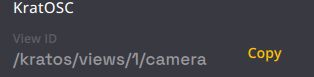
Switches which device/camera feed a camera view displays. <viewId> is the view's OSC identifier, shown (ready to copy) in the camera view's settings panel.
| argument | read/write | description |
|---|---|---|
<device> |
w | Select that device's camera (camera uid 1, or its only camera for a Kam). |
<device>/<camera> |
w | Select a specific camera by name or numeric uid, sent as a single string (e.g. MyDevice/2). |
Devices (Kapta / Kam)
URI: /kratos/devices/<device_name>/<property>
/kratos/kaptas/<device_name>/... is still accepted and still sent, so existing setups keep working. Prefer /kratos/devices/ for new setups.
| property | argument | min | max | read/write | description |
|---|---|---|---|---|---|
connected |
bool | r | Is device connected | ||
address |
string | r | Device IP address | ||
port |
int | 1024 | 65535 | r | Device port |
bandwidth |
int | 0 | 2147483648 | r | Network bandwidth in byte / seconds |
temperature |
float | r | Temperature in °C |
Devices - Camera
URI: /kratos/devices/<device_name>/cameras/<camera_name>/<property>
| property | argument | min | max | read/write | description |
|---|---|---|---|---|---|
enabled |
bool | r | Connect/Disconnect from device | ||
connected |
bool | r | Is Camera connected | ||
fps |
float | 0 | r | Measured Camera fps | |
bandwidth |
int | 0 | 2147483648 | r | USB bandwidth in byte / seconds |
temperature |
float | r | Temperature in °C | ||
exposure |
float | 0 | w | Exposition time in ms | |
gain |
float | 0 | 100 | w | Gain |
BeaKon
URI: /kratos/uwb/<property>
| property | argument | min | max | read/write | description |
|---|---|---|---|---|---|
kit_name |
string | r/w | Set BeaKon Kit Name | ||
use_main_eliko_server |
bool | r/w | Set Use main eliko server |
Timecode
URI: /kratos/timecode/<property>
| property | argument | min | max | read/write | description |
|---|---|---|---|---|---|
enabled |
bool | r/w | Enable LTC input | ||
playback_enabled |
bool | r/w | Enable playback input | ||
connected |
bool | r | Timecode is being received |
Recorder
URI: /kratos/recorder/<property>
| property | argument | min | max | read/write | description |
|---|---|---|---|---|---|
enabled |
bool | r/w | Enable Recorder | ||
duration |
int | r | Record duration in milliseconds | ||
filesize |
int | r | Record size in bytes |
Screens
URI: /kratos/screens/<property>
| property | argument | min | max | read/write | description |
|---|---|---|---|---|---|
current_page |
string | w | Select the page to control |
Available pages are: Live, Cameras (Kaptas in shows created before v1.11), Areas, Actions, Scripts, BeaKons, User 1, User 2.
Simulator Settings
URI: /kratos/simulator/settings/<property>
| property | argument | min | max | read/write | description |
|---|---|---|---|---|---|
enable_kapta |
bool | r/w | Enable devices simulator (playback from file) | ||
enable_beakon |
bool | r/w | Enable BeaKon simulator (playback from file) | ||
enable_kore |
bool | r/w | Enable Kore simulator (playback from file) | ||
filepath |
string | r/w | Path to the .kramera playback file | ||
sync_with_timecode |
bool | r/w | Sync simulation playback with timecode input |
Simulator Playback
URI: /kratos/simulator/playback/<property>
| property | argument | min | max | read/write | description |
|---|---|---|---|---|---|
play |
no argument | w | Start playback | ||
pause |
no argument | w | Pause playback | ||
stop |
no argument | w | Stop playback | ||
seek |
int | w | Seek to position in milliseconds | ||
seek_next_frame |
no argument | w | Advance one frame forward | ||
seek_previous_frame |
no argument | w | Go back one frame | ||
seek_begin |
no argument | w | Seek to the beginning | ||
seek_end |
no argument | w | Seek to the end |
Kore
URI: /kratos/kore/<property>
| property | argument | min | max | read/write | description |
|---|---|---|---|---|---|
restart |
no argument | w | Restart Kore software |