Calibration Database
The Calibration Database (Naostage Kloud) is an online database of factory optical calibrations for Kam and Kapta devices. When a known device connects to Kratos, the matching factory calibration is applied automatically, so you don't have to import a calibration file by hand.
No account needed.
Access to the Calibration Database is anonymous and read-only. There is no sign-in, and no per-user data is stored.
Enabling the Calibration Database
The Calibration Database comes with Device Auto Discovery. Enable the Device Auto Discovery preview feature in the Show Explorer Feature Preview tab: this turns on the automatic calibration of devices, and shows the database button and the per-device calibration badges. With the preview off, the Calibration Database is not used.
Automatic calibration on connect
When a Kam or Kapta connects (whether added manually or via Auto Discovery), Kratos identifies it by MAC address or serial number, looks it up in the database and applies the matching factory calibration automatically. A notification confirms when a calibration is loaded.
If a device is not found in the database, Kratos falls back to the embedded calibration that ships inside the device's own firmware. The device's calibration badge then indicates that the embedded (shipped) calibration is in use.
Working offline
The database is kept on the station, so device lookups and automatic calibration keep working without a network connection. The network is only needed to sync the database or check for updates.
For air-gapped setups you can also import a database file provided by Naostage using Import file in the Calibration Database dialog.
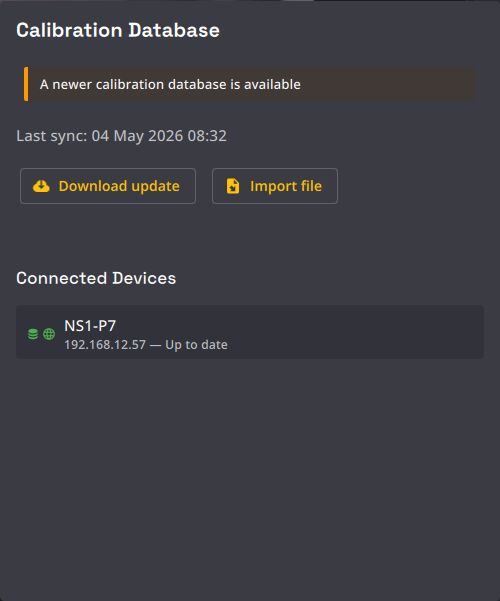
The Calibration Database dialog
Open the dialog from the Calibration Database button (database icon) in the Show Explorer Cameras tab.
| Control | Description |
|---|---|
| Last sync | When the local database was last synced (or Never synced). |
| Check for update / Download update | Check the online database for a newer version and download it. |
| Import file | Import a calibration database file provided by Naostage. |
| Connected Devices | Lists connected devices and their calibration status. |
| Load latest | For a connected device with a newer calibration available, load it. |
On first launch, Kratos downloads the database automatically; a banner indicates the initial download is in progress.
Calibration status badges
Each device (and camera) shows a calibration status badge:

- Using embedded calibration : the device is using the calibration shipped in its firmware (not found in the database).
- Calibration up to date : the device is using the latest known calibration.
- Newer calibration available : a newer calibration exists; use Load latest or download the database update.
A global banner also appears when a newer database version is available online.
The Calibration Database stores factory device calibrations — the cameras' intrinsics. Calibrating each camera's position in your venue is still done separately, with Free Calibration or the legacy calibration.