Use a SpaceMouse in 2D on a view
With 2D Mode, the SpaceMouse pans the Target within a camera's image instead of moving it along the 3D world axes.
This tutorial assumes you already have a working SpaceMouse module (see Connect a SpaceMouse to Kratos).
Open and focus a camera view
- Open a camera view showing the camera you want to pan, and link it to your SpaceMouse module in its settings (SpaceMouse Module dropdown of the Follow section).
- The view header shows a SpaceMouse chip with the controlled Target's avatar, name and color. Click it to focus this view for the module: 2D pan, zoom and the SpaceMouse cursor act on the focused view.

If no view is focused, Kratos shows a toast: No camera view focused for SpaceMouse.
Enable 2D Mode
In the SpaceMouse module's Control settings, turn on 2D Mode.
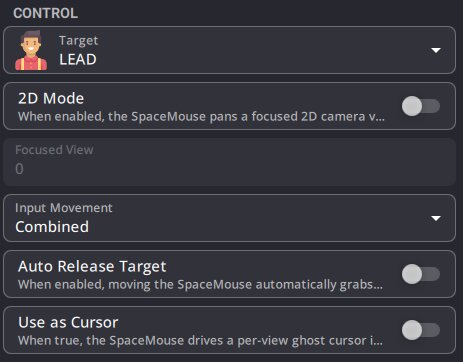
- The X/Y axes now drag the Target in the focused camera's image plane.
- Set 2D Sensitivity (image widths per second) for the pan speed in the Advanced section. It is the same at any zoom unless you turn on 2D Speed Follows Zoom.
- The deadzones, inversion, swap, response curve, Auto Release Target and Bounding Area still apply.
Pan the Target
Put the Target in manual mode (or turn on Auto Release Target), then move the SpaceMouse: the Target pans across the image. Switching the focused camera changes which view you control.
Turn on Z as Zoom (and Enable Z) to also control the camera zoom from the same device (the view zooms centered on the SpaceMouse Target).
Quick Assign with the SpaceMouse cursor
K SYSTEM Sense only
Quick Assign patches Targets to Trackers created by the Kore AI.
Turn on Use as Cursor (in Control) to make the SpaceMouse move its own cursor on the focused view instead of the Target, and set one of the buttons to Quick Assign:
- Move the SpaceMouse cursor over the person to track.
- Hold the Quick Assign button: the on-video preview shows the search radius and the candidate Tracker.
- Release the button: the Target is assigned to the closest Tracker.
This works alongside the mouse and keyboard Quick Assign: each SpaceMouse has its own cursor.
Use as Cursor and Auto Release Target cannot be used together.